EN⌄
Panel sign-inRegister your school

FOR PRESCHOOLS & NURSERIES

Your school day,
made simpler.

Whether you run a single classroom or a larger school, keep everyday tasks simple. Once your account is activated, start student records, attendance and parent communication that same day.

Mobile appWeb management panelKiosk
A teacher and a parent talking at the school entrance
Modules in the OkulMobil mobile appA daily report with meals, attendance and teacher notes

Actual app screens with sample data.

OkulMobil apps for your phone and classroom computer.

Downloads

A QUICK LOOK AT OKULMOBIL

Let’s take a tour.

Start with the task you need: attendance, a daily note or parent communication. Explore other features as your school needs them.
0110
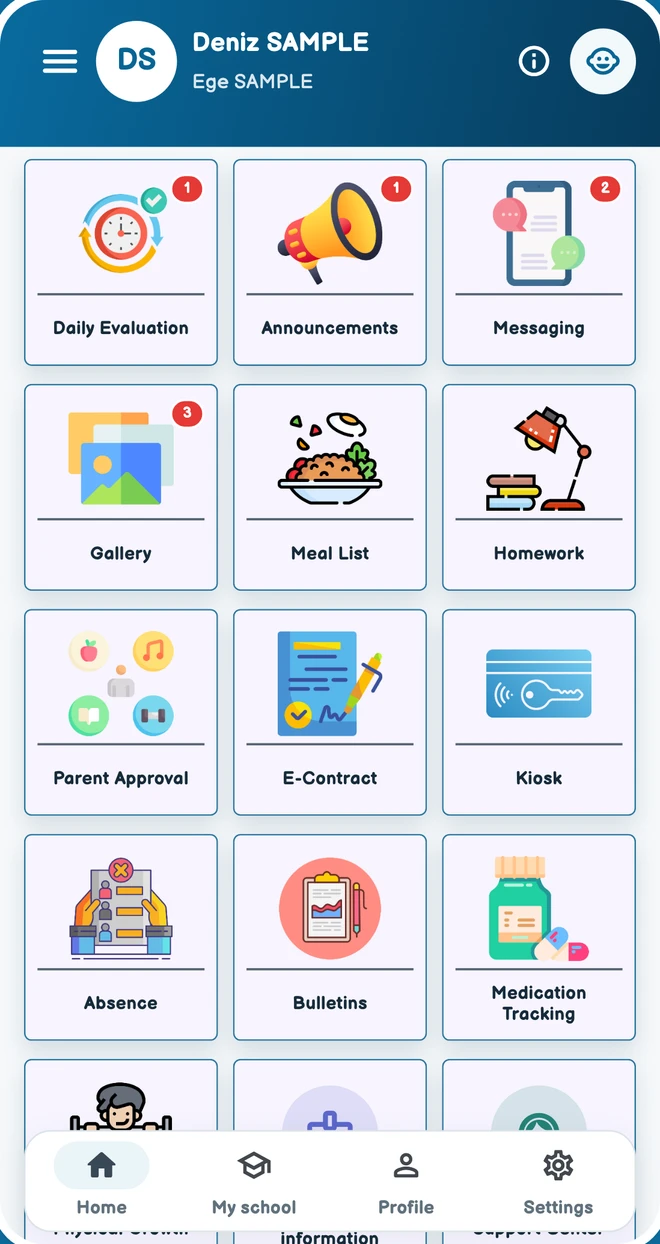
OkulMobil home screen with school updates, messages and parent features.

01 / 10

School life. One app.

Stay connected with your school.

Explore this solution

Actual app screens with sample data.

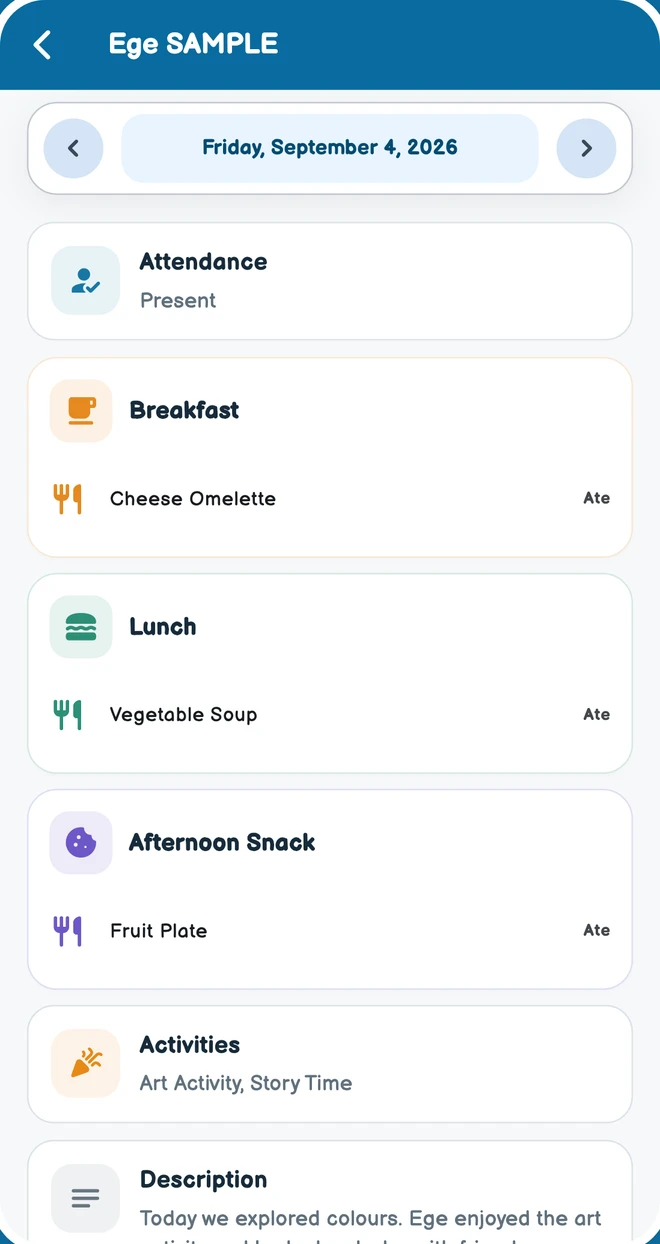
Daily update with sample meals, activities and teacher notes.

02 / 10

Follow the day, together.

Meals, activities and teacher notes.

Explore this solution

Actual app screens with sample data.

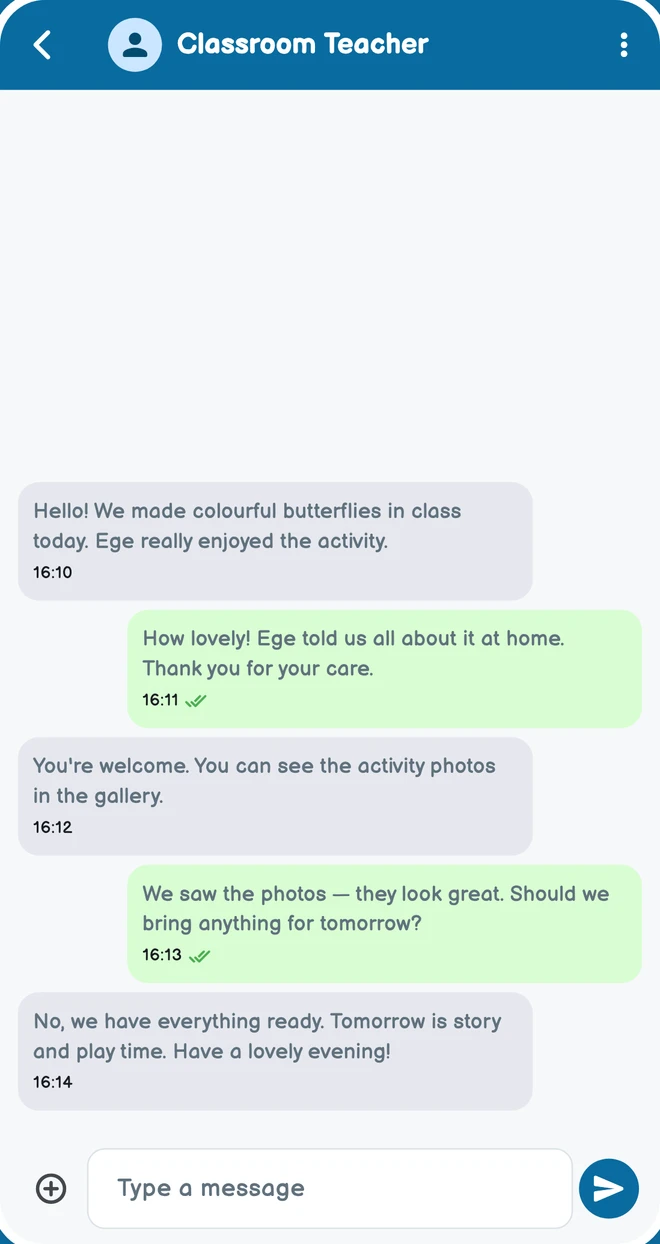
A sample conversation between a parent and a classroom teacher.

03 / 10

Stay close. Keep in touch.

A direct conversation with your teacher.

Explore this solution

Actual app screens with sample data.

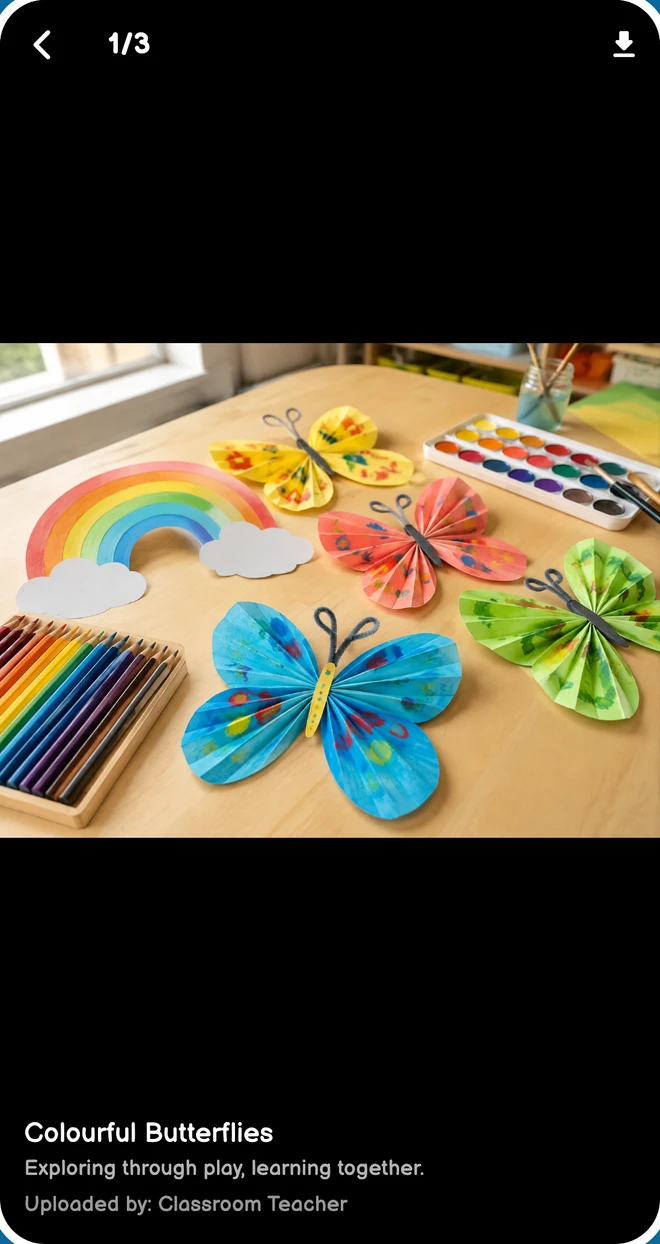
Gallery viewer showing an AI-generated paper butterfly activity photo.

04 / 10

Little moments. Lovely memories.

Photos and videos shared by your school.

Explore this solution

Actual app screens with sample data.

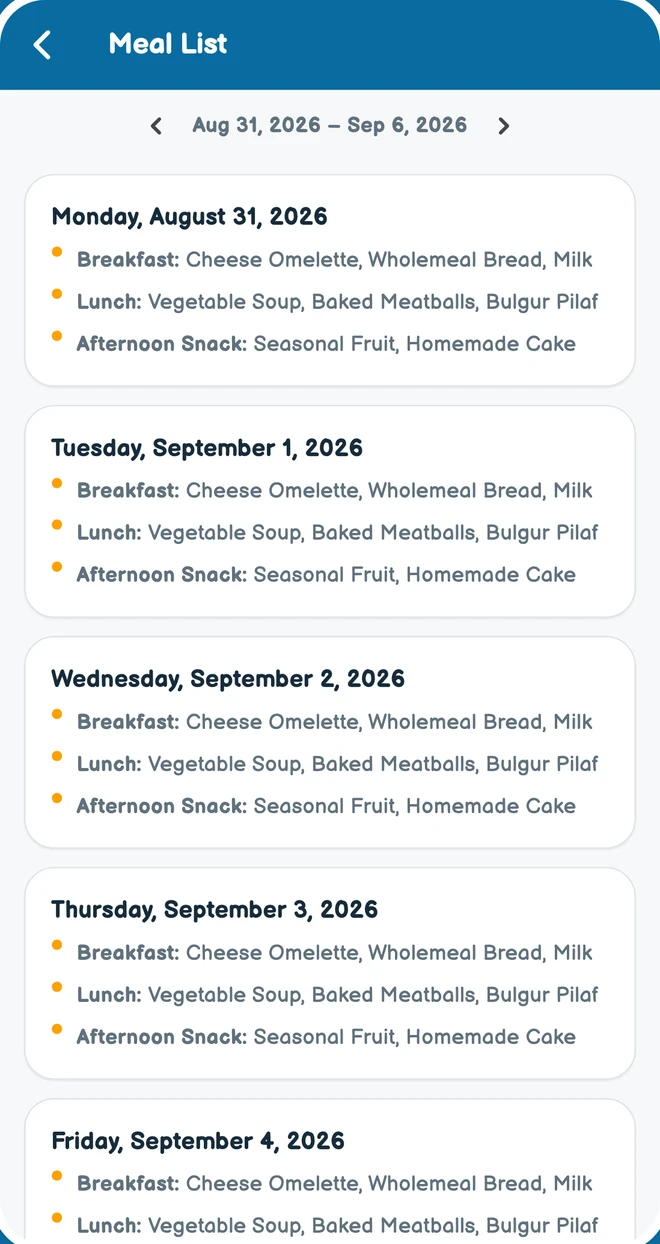
Weekly school menu with sample breakfast, lunch and snack options.

05 / 10

What's on the menu?

Your school's meal plan at your fingertips.

Explore this solution

Actual app screens with sample data.

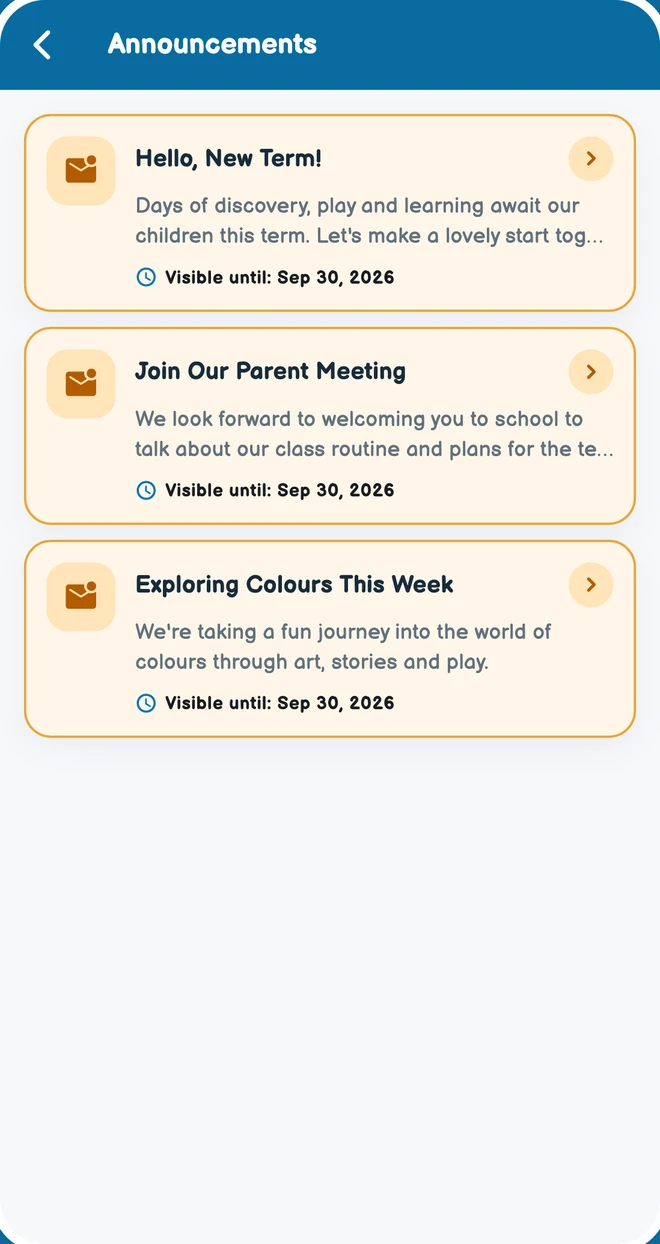
School announcements about the new term, parent meeting and activities.

06 / 10

Stay in the school loop.

All school announcements in one place.

Explore this solution

Actual app screens with sample data.

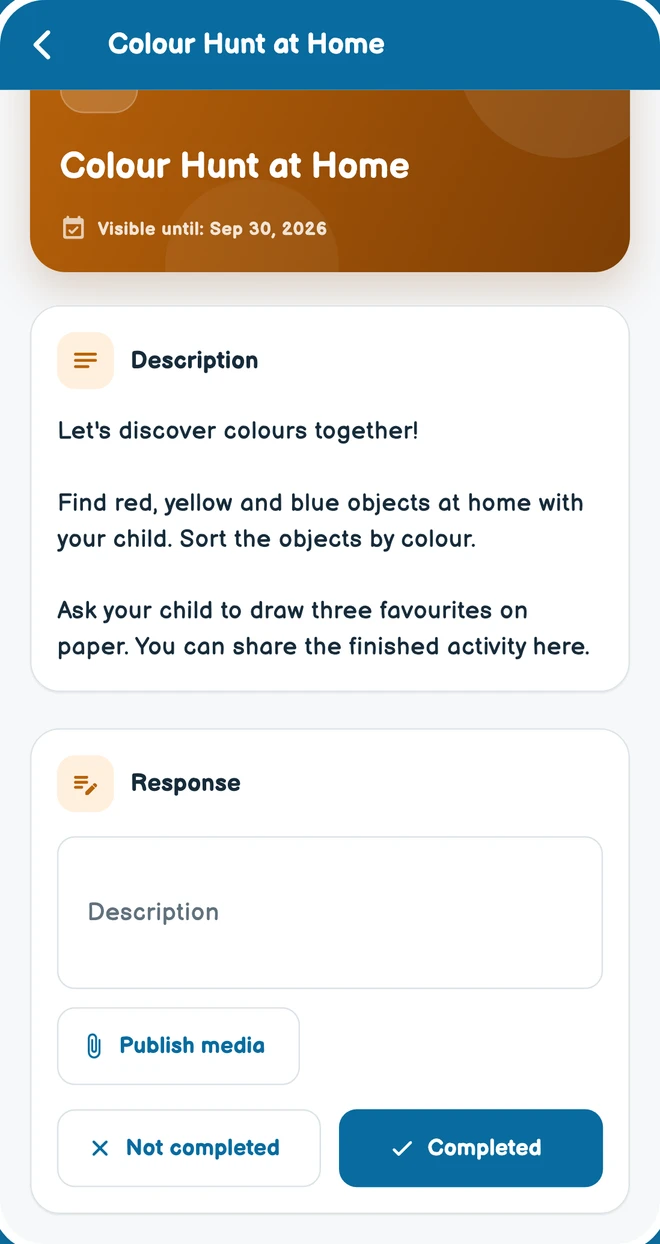
A colour hunt homework activity with parent response options.

07 / 10

Learning goes home, too.

Follow homework and activity instructions.

Explore this solution

Actual app screens with sample data.

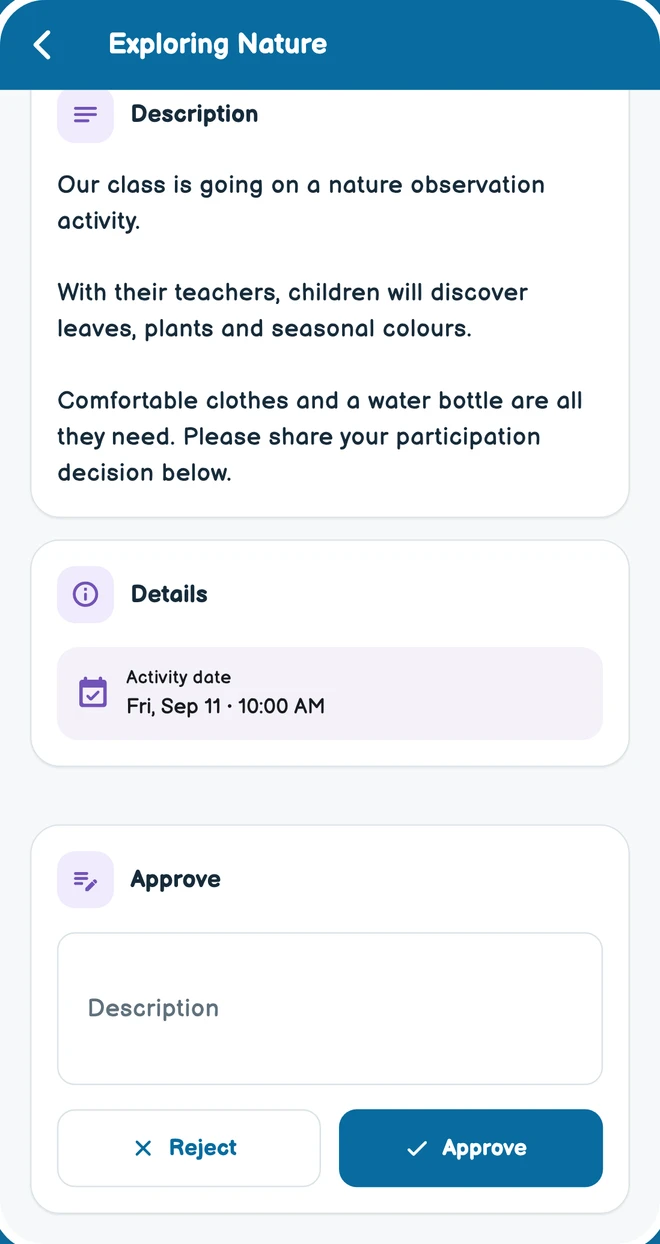
School activity details, date and parent consent response buttons.

08 / 10

Parent consent. All in one place.

Review activities and share your decision.

Explore this solution

Actual app screens with sample data.

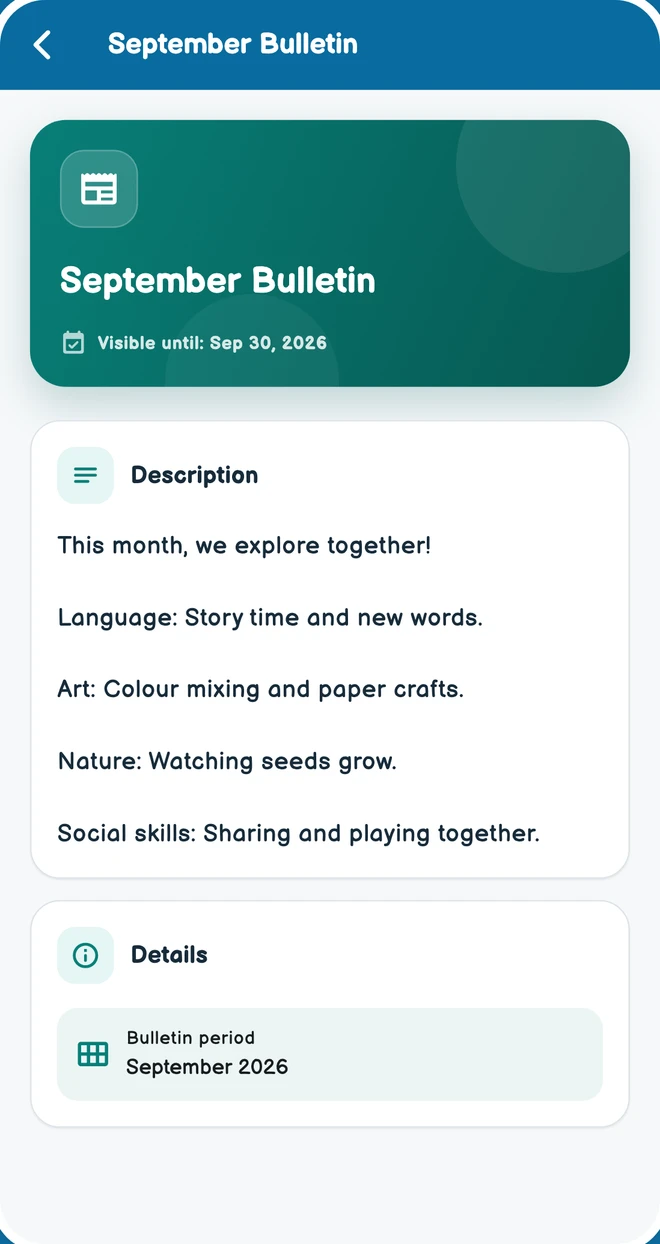
Monthly bulletin with sample learning plans and classroom activities.

09 / 10

Keep up with school life.

Term plans and news from the classroom.

Explore this solution

Actual app screens with sample data.

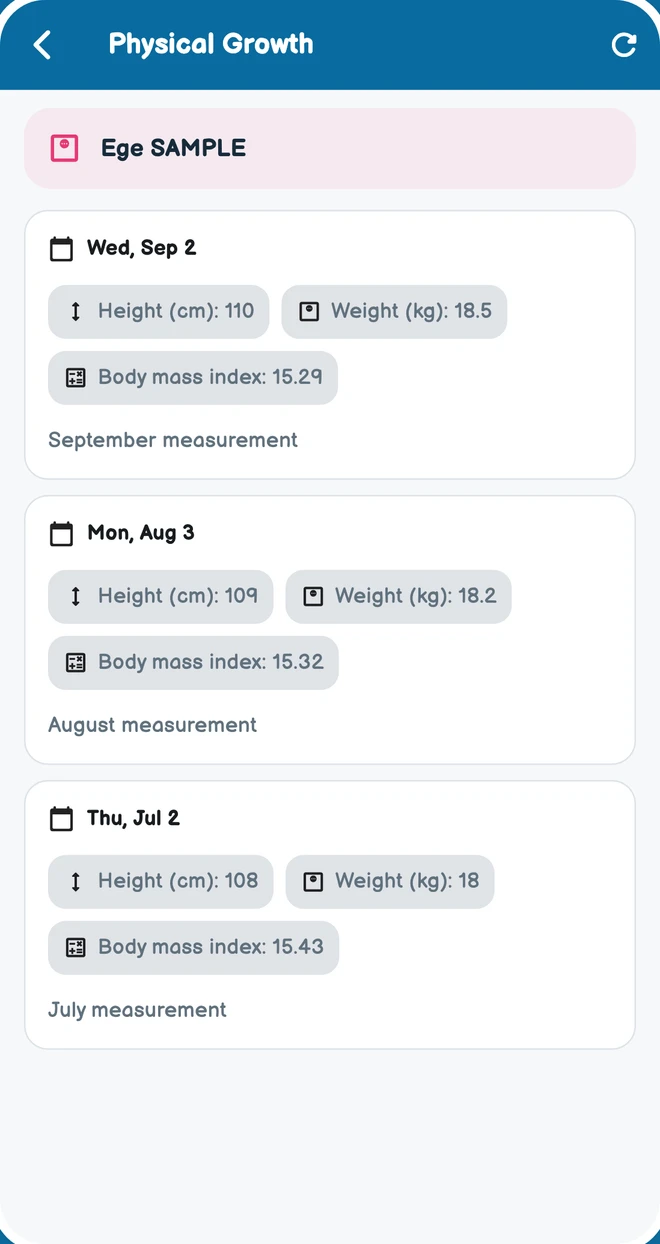
Sample student height and weight measurements across three dates.

10 / 10

Follow their growth together.

Keep track of height and weight.

Explore this solution

Actual app screens with sample data.

Your first day in three simple steps.

Start with what you need today. You do not need to learn every OkulMobil feature on day one.

  1. 01

    Access your account

    Contact us to activate your school account, then sign in with your own account.

  2. 02

    Set up your first classroom

    Add classroom, student and teacher details to prepare your first daily routine.

  3. 03

    Share today’s updates

    Take attendance, add a short daily note and communicate with the relevant parents.

Same-day start refers to basic daily use after account activation. Existing-record migration and any chosen kiosk hardware installation are planned separately.

Start simply at your school.

OKULMOBİL

Discover OkulMobil in five steps.

Choose a topic and explore its modules. Open a screen or module card for details without leaving this page.
Starting the day

Growth and activities

News from school

Learning and approvals

Management and other tools

Student & family records

Student profiles, parent and family connections, contact details and records.

Explore module

Classes & assignments

Create classes, place students and assign classroom or subject teachers.

Explore module

Staff & invitations

Staff records, positions, school access and invitations.

Explore module

Student transfers

Manage transfer requests, school changes and student transfer workflows.

Explore module

Send Notification

Publish content for selected audiences and follow shared updates.

Explore module

Surveys

Publish surveys to relevant parents, respond and view results according to permissions.

Explore module

Learning materials

Share and organise files and educational resources for the relevant staff audience.

Explore module
Electronic agreements & onboarding

Prepare agreement text, consent clauses, requested information and documents.

Explore module
Planned Payments

Create period, installment, and stationery plans per student and apply collections to installments.

Explore module

Account Transactions

Record an independent collection on the student account without creating a plan or installment.

Explore module

Expense management

Record school expenses, descriptions and attachments to follow financial operations.

Explore module
Kiosk & arrivals

Kiosk devices, cards, digital cards and parent arrival notifications.

Explore module

Live location sharing

Share an authorised staff member’s active location session with relevant parents.

Explore module

Information Requests

Follow information requested by the school and related responses in the mobile app, and complete required record details.

Explore module

Student information

Follow information requested by the school and related responses in the mobile app, and complete required record details.

Explore module

Professional profile & CV

Staff maintain their professional profiles and CVs; administrators review relevant application and CV workflows.

Explore module

Support & feedback

Support requests, conversations and status updates.

Explore module

Parents

Student profiles, parent and family connections, contact details and records.

Explore module

Management Center

Administrators use the web panel and mobile app to manage school, staff, financial workflows and content within their permissions.

Explore module

School information

Manage the school’s contact and organisation information.

Explore module

Availability depends on the modules enabled by the school, assigned permissions and your classroom or child relationship.

School & organisation

Student & family records

Student profiles, parent and family connections, contact details and records. Administrators manage records; teacher and parent access follows their own scope.

Web panelMobile app

Administrators · Teachers · Classroom teachers · Parents

Availability depends on the modules enabled by the school, assigned permissions and your classroom or child relationship.

School & organisation

Classes & assignments

Create classes, place students and assign classroom or subject teachers. Teachers view relevant class and student information.

Web panelMobile app

Administrators · Teachers · Classroom teachers

Availability depends on the modules enabled by the school, assigned permissions and your classroom or child relationship.

School & organisation

Staff & invitations

Staff records, positions, school access and invitations. Panel access and school administration permissions are assigned separately.

Web panelMobile app

Administrators

Availability depends on the modules enabled by the school, assigned permissions and your classroom or child relationship.

School & organisation

Student transfers

Manage transfer requests, school changes and student transfer workflows.

Web panelMobile app

Administrators

Availability depends on the modules enabled by the school, assigned permissions and your classroom or child relationship.

Daily life & development

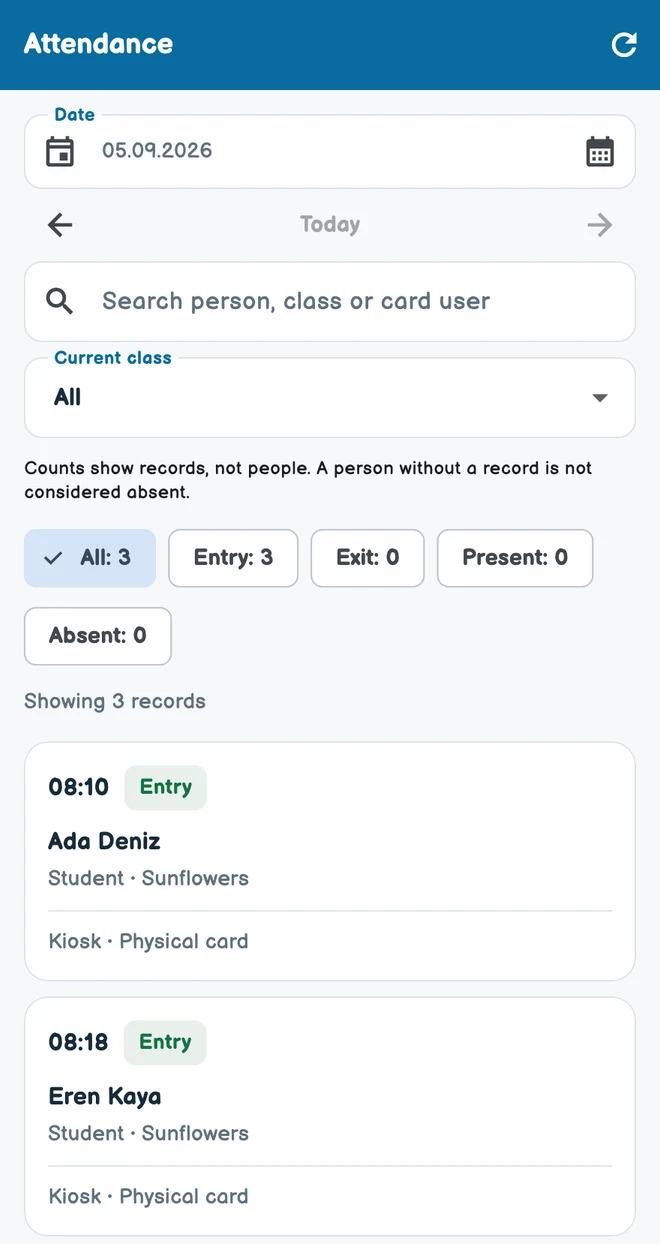
Attendance & absence

Daily class attendance, attendance records and absence tracking. Parents see information relating to their own children.

Web panelMobile app

Administrators · Classroom teachers · Parents

Availability depends on the modules enabled by the school, assigned permissions and your classroom or child relationship.

Daily life & development

Daily & subject reports

Daily reports covering meals, activities and teacher notes. Subject teachers can prepare class-based subject evaluations.

Web panelMobile app

Administrators · Teachers · Classroom teachers · Parents

Availability depends on the modules enabled by the school, assigned permissions and your classroom or child relationship.

Daily life & development

Meal plans

Dated meal and menu plans. Administrators prepare the lists; teachers and parents view them.

Web panelMobile app

Administrators · Teachers · Classroom teachers · Parents

Availability depends on the modules enabled by the school, assigned permissions and your classroom or child relationship.

Daily life & development

Activity planning

Organise activity definitions and dates alongside daily school routines. Authorised classroom teachers also have activity tools in the mobile app.

Web panelMobile app

Administrators · Classroom teachers

Availability depends on the modules enabled by the school, assigned permissions and your classroom or child relationship.

Daily life & development

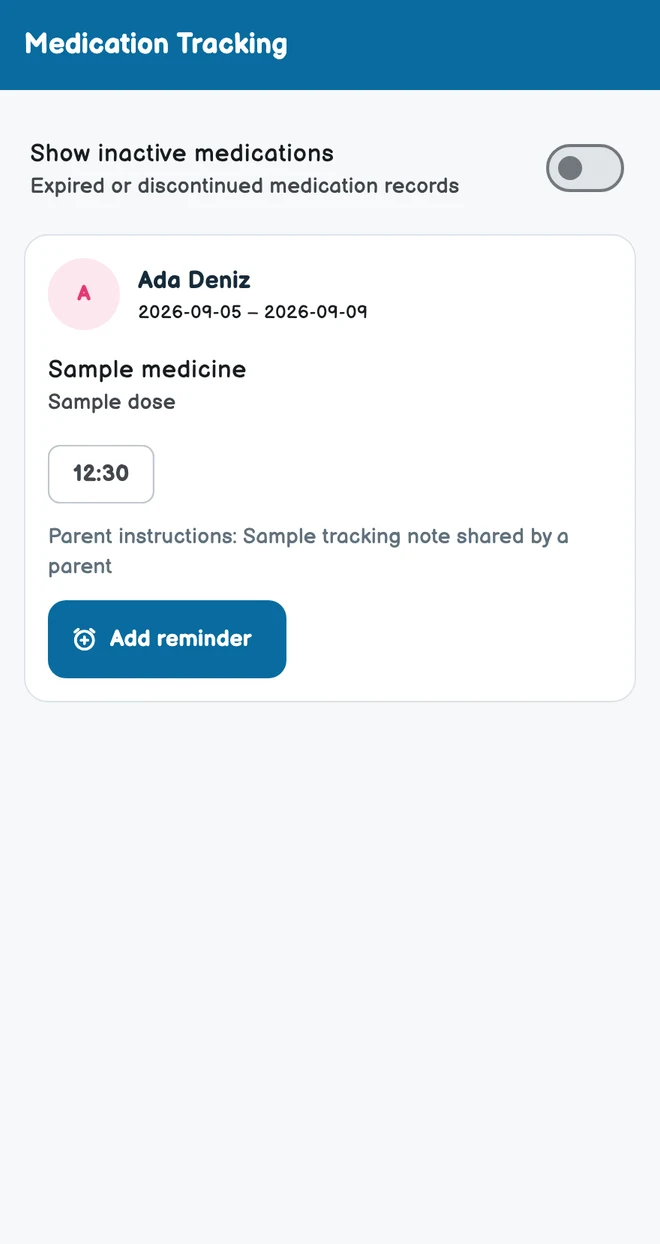
Medication & health tracking

Medication details, prescription attachments, administration records and teacher notes, shared within authorised class staff and parent access.

Web panelMobile app

Administrators · Classroom teachers · Parents

Availability depends on the modules enabled by the school, assigned permissions and your classroom or child relationship.

Daily life & development

Physical growth

Record dated height and weight measurements and follow development. Parents view their children’s shared records.

Web panelMobile app

Administrators · Teachers · Classroom teachers · Parents

Availability depends on the modules enabled by the school, assigned permissions and your classroom or child relationship.

Messaging

Actual app screens with sample data.

Communication & sharing

Messaging

Individual and group conversations, files and media in the mobile app. Communication follows school and contact relationships.

Mobile app

Administrators · Teachers · Classroom teachers · Parents

Availability depends on the modules enabled by the school, assigned permissions and your classroom or child relationship.

Photo & video gallery

Actual app screens with sample data.

Communication & sharing

Share activity photos and videos with relevant classes and families, and follow viewing information.

Mobile app

Administrators · Teachers · Classroom teachers · Parents

Availability depends on the modules enabled by the school, assigned permissions and your classroom or child relationship.

Announcements

Actual app screens with sample data.

Communication & sharing

Announcements

All school announcements in one place.

Web panelMobile app

Administrators · Teachers · Classroom teachers · Parents

Availability depends on the modules enabled by the school, assigned permissions and your classroom or child relationship.

Bulletins

Actual app screens with sample data.

Communication & sharing

Bulletins

Term plans and news from the classroom.

Web panelMobile app

Administrators · Teachers · Classroom teachers · Parents

Availability depends on the modules enabled by the school, assigned permissions and your classroom or child relationship.

Homework

Actual app screens with sample data.

Communication & sharing

Homework

Follow homework and activity instructions.

Web panelMobile app

Administrators · Teachers · Classroom teachers · Parents

Availability depends on the modules enabled by the school, assigned permissions and your classroom or child relationship.

Communication & sharing

Send Notification

Publish content for selected audiences and follow shared updates. Administrators can also send notifications.

Web panelMobile app

Administrators

Availability depends on the modules enabled by the school, assigned permissions and your classroom or child relationship.

Parental consents

Actual app screens with sample data.

Communication & sharing

Parental consents

School consent requests and parent responses. Follow the request’s status in the same record.

Web panelMobile app

Administrators · Teachers · Classroom teachers · Parents

Availability depends on the modules enabled by the school, assigned permissions and your classroom or child relationship.

Communication & sharing

Surveys

Publish surveys to relevant parents, respond and view results according to permissions. Not available to subject teachers.

Web panelMobile app

Administrators · Classroom teachers · Parents

Availability depends on the modules enabled by the school, assigned permissions and your classroom or child relationship.

Communication & sharing

Learning materials

Share and organise files and educational resources for the relevant staff audience.

Web panelMobile app

Administrators · Teachers · Classroom teachers

Availability depends on the modules enabled by the school, assigned permissions and your classroom or child relationship.

Finance & enrolment

Electronic agreements & onboarding

Prepare agreement text, consent clauses, requested information and documents. Parents complete assigned agreement steps in the mobile app.

Web panelMobile app

Administrators · Parents

Availability depends on the modules enabled by the school, assigned permissions and your classroom or child relationship.

Finance & enrolment

Planned Payments

Create period, installment, and stationery plans per student and apply collections to installments.

Web panelMobile app

Administrators · Parents

Availability depends on the modules enabled by the school, assigned permissions and your classroom or child relationship.

Finance & enrolment

Account Transactions

Record an independent collection on the student account without creating a plan or installment.

Web panelMobile app

Administrators · Parents

Availability depends on the modules enabled by the school, assigned permissions and your classroom or child relationship.

Finance & enrolment

Expense management

Record school expenses, descriptions and attachments to follow financial operations.

Web panelMobile app

Administrators

Availability depends on the modules enabled by the school, assigned permissions and your classroom or child relationship.

Support & connection

Kiosk & arrivals

Kiosk devices, cards, digital cards and parent arrival notifications. Availability depends on school kiosk settings and permissions.

Web panelMobile app

Administrators · Parents

Availability depends on the modules enabled by the school, assigned permissions and your classroom or child relationship.

Support & connection

Live location sharing

Share an authorised staff member’s active location session with relevant parents. Sharing continues only during the active session.

Mobile app

Administrators · Teachers · Classroom teachers · Parents

Availability depends on the modules enabled by the school, assigned permissions and your classroom or child relationship.

Support & connection

Information Requests

Follow information requested by the school and related responses in the mobile app, and complete required record details.

Mobile app

Administrators · Teachers · Classroom teachers · Parents

Availability depends on the modules enabled by the school, assigned permissions and your classroom or child relationship.

Support & connection

Student information

Follow information requested by the school and related responses in the mobile app, and complete required record details.

Mobile app

Administrators · Teachers · Classroom teachers · Parents

Availability depends on the modules enabled by the school, assigned permissions and your classroom or child relationship.

Support & connection

Professional profile & CV

Staff maintain their professional profiles and CVs; administrators review relevant application and CV workflows.

Mobile app

Administrators · Teachers · Classroom teachers

Availability depends on the modules enabled by the school, assigned permissions and your classroom or child relationship.

Support & connection

Support & feedback

Support requests, conversations and status updates. Follow the support process between your school and OkulMobil.

Web panelMobile app

Administrators · Teachers · Classroom teachers · Parents

Availability depends on the modules enabled by the school, assigned permissions and your classroom or child relationship.

School & organisation

Parents

Student profiles, parent and family connections, contact details and records. Administrators manage records; teacher and parent access follows their own scope.

Web panelMobile app

Administrators

Availability depends on the modules enabled by the school, assigned permissions and your classroom or child relationship.

School & organisation

Management Center

Administrators use the web panel and mobile app to manage school, staff, financial workflows and content within their permissions.

Web panelMobile app

Administrators

Availability depends on the modules enabled by the school, assigned permissions and your classroom or child relationship.

School & organisation

School information

Manage the school’s contact and organisation information.

Web panel

Administrators

Availability depends on the modules enabled by the school, assigned permissions and your classroom or child relationship.

01 / SCHOOL LIFE

From the first hello to the last update.

Beside your school at every step. Close to families with every update.

  1. 1

    Getting started

    Electronic agreements · Parental consents

  2. 2

    The school day

    Attendance · Meal plans · Activities

  3. 3

    Growing together

    Daily reports · Medication tracking · Physical growth

  4. 4

    Keeping in touch

    Messaging · Announcements · Gallery

A teacher and three children doing a colorful paper craft activity together in a classroom

So much more than communication.

01

Manage your school

Student and staff records, payment plans and electronic agreements.

02

Follow their development

Daily reports, health records and physical growth.

03

Stay connected

Messaging, bulletins, surveys and live location sharing.

Explore all features

02 / OKULMOBIL FOR YOU

One school. Different needs.

Explore the tools for your role, on the platform you use.

One school.
7 languages.

Multilingual access in the mobile app and web panel.

FAQ

Get to know OkulMobil.

Frequently asked questions
What is OkulMobil and what is it for?

OkulMobil is an easy-to-use preschool and childcare management and parent communication app, designed with a clear, elegant interface for schools of every size, from a small nursery to a larger institution. Whether you run a single classroom or a larger school, keep everyday tasks simple. Once your account is activated, start student records, attendance and parent communication that same day.

Which school problems does it address?

Scattered messages, paper forms, separate payment lists and repeated questions about the school day make information hard to follow. OkulMobil connects attendance, daily reports, menus, announcements, approvals and payment records to the relevant student and school processes. Staff can follow what has been shared, while families can find updates about their child.

Which solutions does it bring together?

It covers student, classroom and staff management; attendance, daily reports, meals and activities; medication and growth records; messaging, galleries, announcements, newsletters, homework, surveys and parental approvals; e-contracts, payment plans, collection records and expenses. Kiosk, live location sharing, information requests, CVs and support are also included. Availability depends on role, platform and enabled school modules.

Start simply at your school.

Let’s get your first classroom and daily routine ready. Call or message us on WhatsApp to get started.

Get in touch

Choosing software for your daycare

Can a small daycare start with just attendance and daily reports?

Yes. Start with your children, classrooms and authorised staff. Practise taking attendance and sharing meals, sleep and daily notes with a linked parent account before adding more workflows. OkulMobil’s web panel and mobile app give each role access to the relevant tasks.

See the selection guide →
Does a parent need access to the school’s management panel?

Parents use the mobile app to see the information their school shares about their child. The school links the parent to the child; downloading the app alone does not establish that connection. Administrative records remain subject to staff permissions.

Getting started as a parent →